Skip to content
SimplePulse
DE

Your Apple Health data. Simple.

Many health apps are overloaded. SimplePulse shows only what matters.

Heart, body, training and sleep at a glance. Clear charts, no scores, no account.

Still in testing

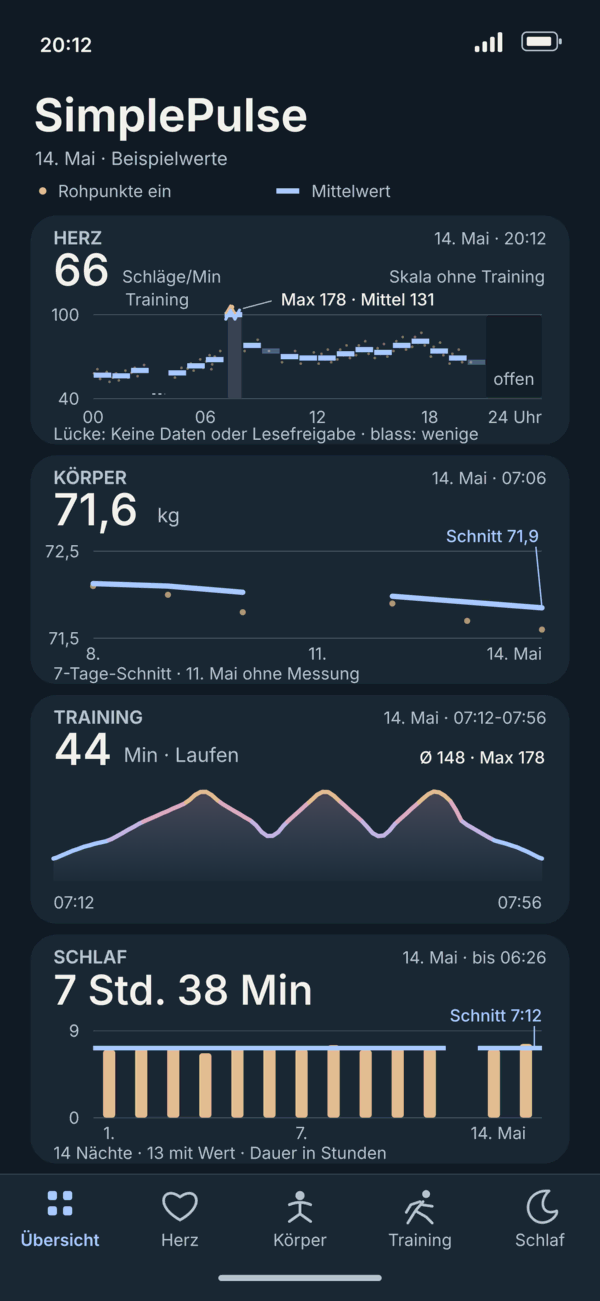
SimplePulse main screen with the heart, body, training and sleep cards. Sample values.
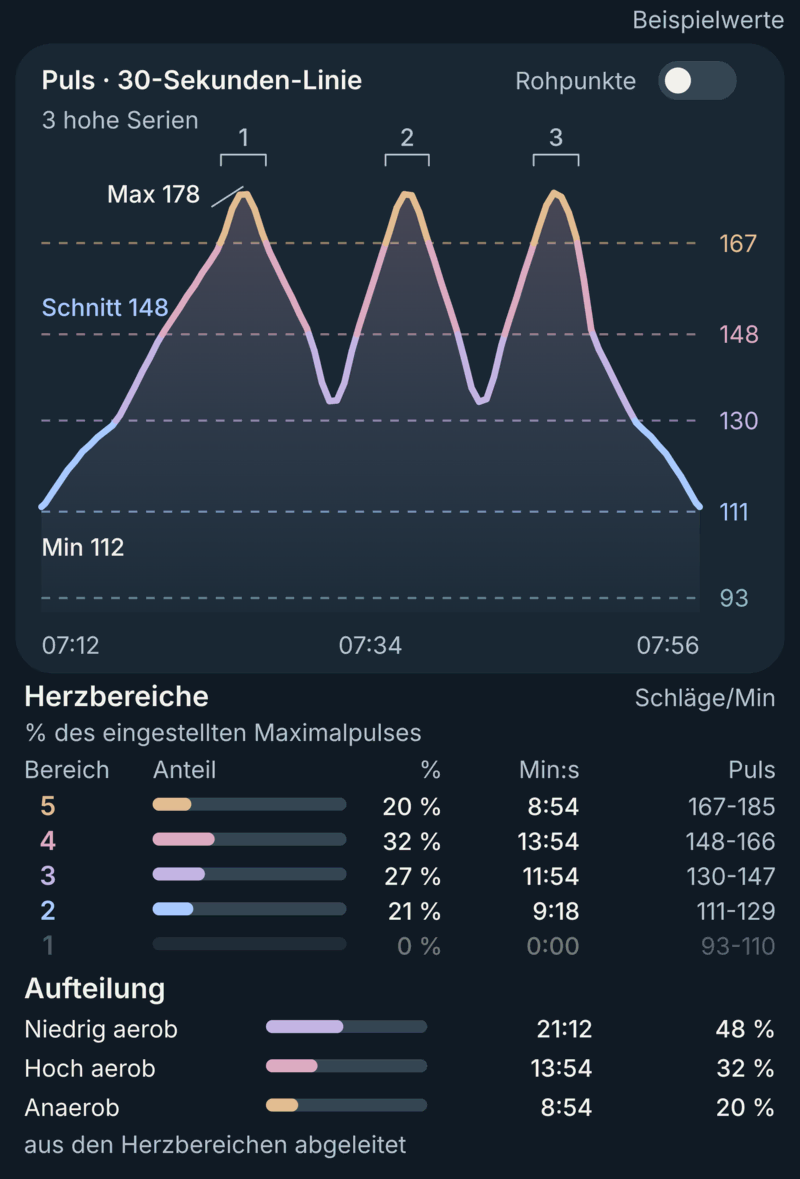
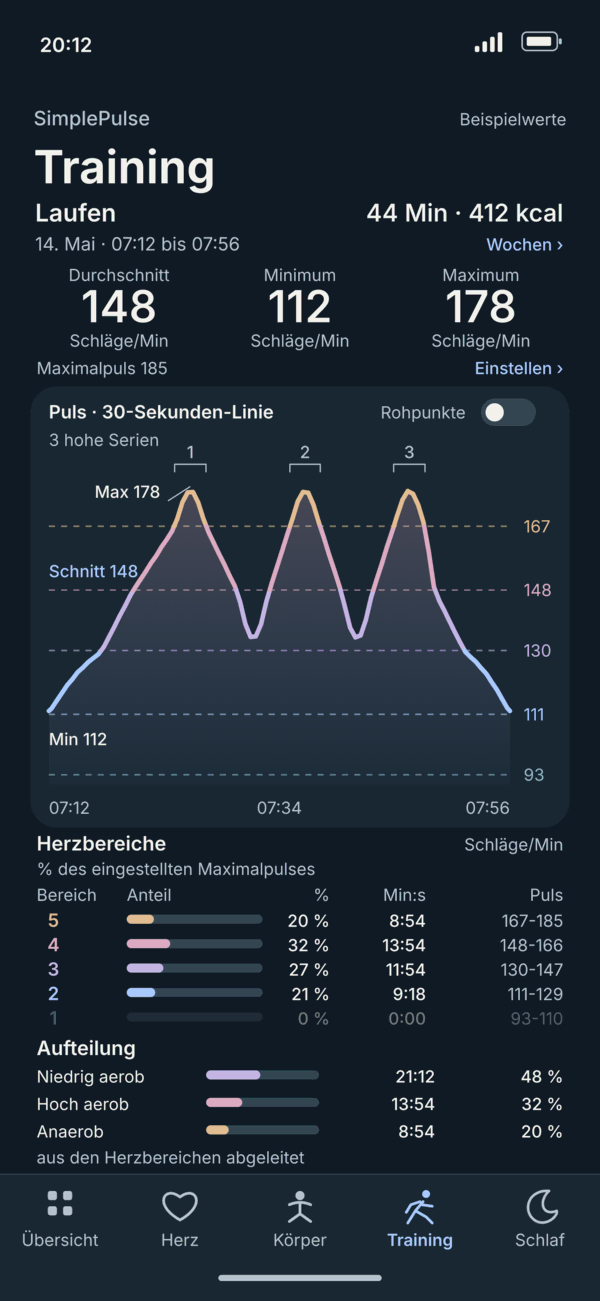
SimplePulse training screen with pulse curve and heart zones. Sample values.
Sample values: All numbers in the pictures are made up. The app is in German for now.
  • No server

    The app sends your values nowhere.

  • No account

    No sign-up, no email address.

  • No scores

    You see measurements, not grades.

  • Every measurement counts

    What Apple Health delivers shows up.

Many apps show everything at once. SimplePulse shows what you came to check.

Ratings, points and tips often sit on the same screen as your measurements, and the one value you want gets lost. SimplePulse has five areas: Overview, Heart, Body, Training and Sleep. Each shows measurements and how they change, nothing else.

Heart

You just want to see where your pulse was today. You don't need a rating for that.

Pick day, week, month or year. Bars show the average per section, and a switch shows the single measurements. Sections without a measurement stay empty. Resting pulse, walking pulse and the other heart values each have their own tab.
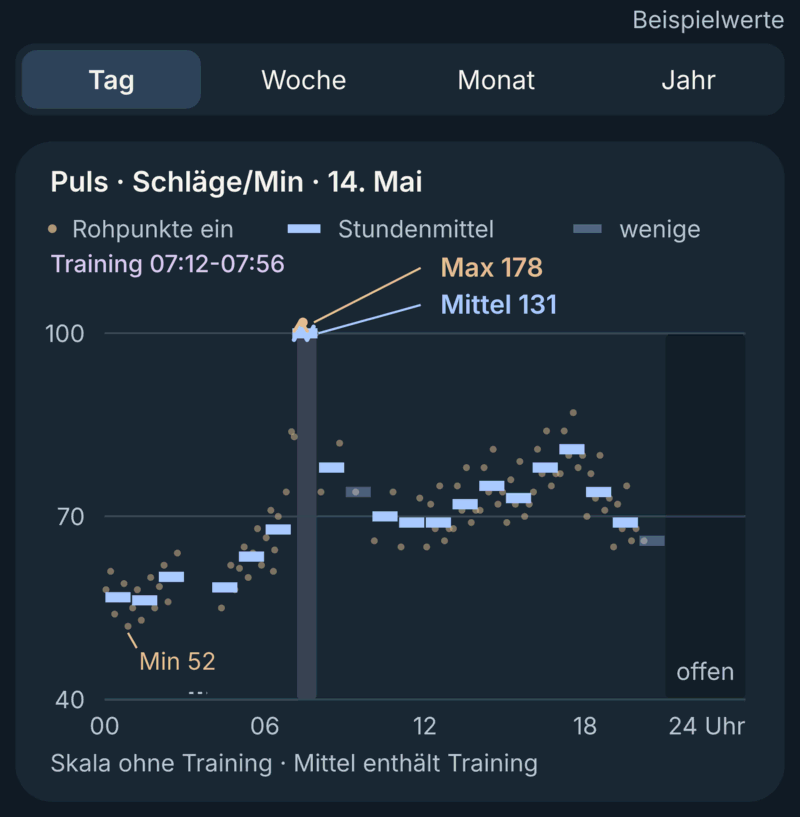
Pulse chart for one day with hourly bars and a day, week, month, year selector. Sample values.

Body

Weight moves from day to day. One morning says little.

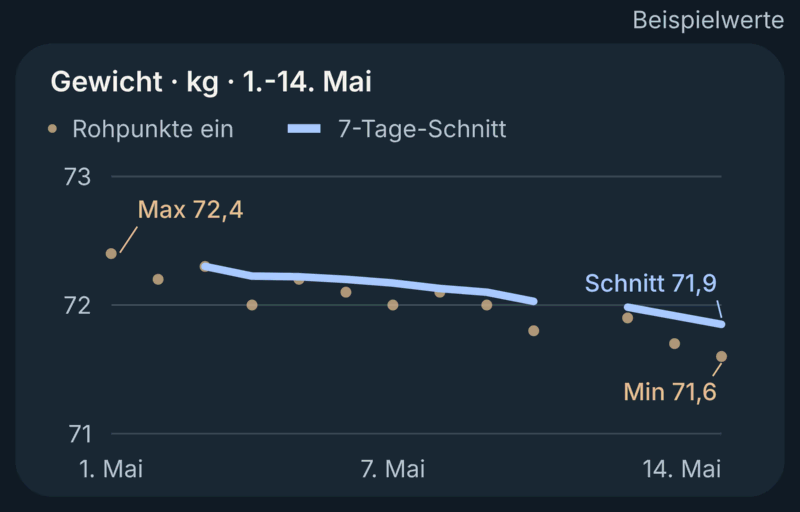
So next to the single measurements you see the seven-day average. Body fat, lean mass and BMI appear once they are in Apple Health.

Weight over two weeks with single measurements and a seven-day average. Sample values.

Training

After a workout you want to see how it went, not get a grade for it.

The pulse curve shows the whole workout with your high series. Below it you see the time in the five heart zones and the aerobic and anaerobic share. The zones come from the maximum pulse you enter yourself. The aerobic and anaerobic share is derived from them, so it is an approximation, and it is marked as one.

Pulse curve of a run with three high series, with the time in each heart zone below. Sample values.

Sleep

In the morning one question is often enough: How long was the night, and where was the pulse?

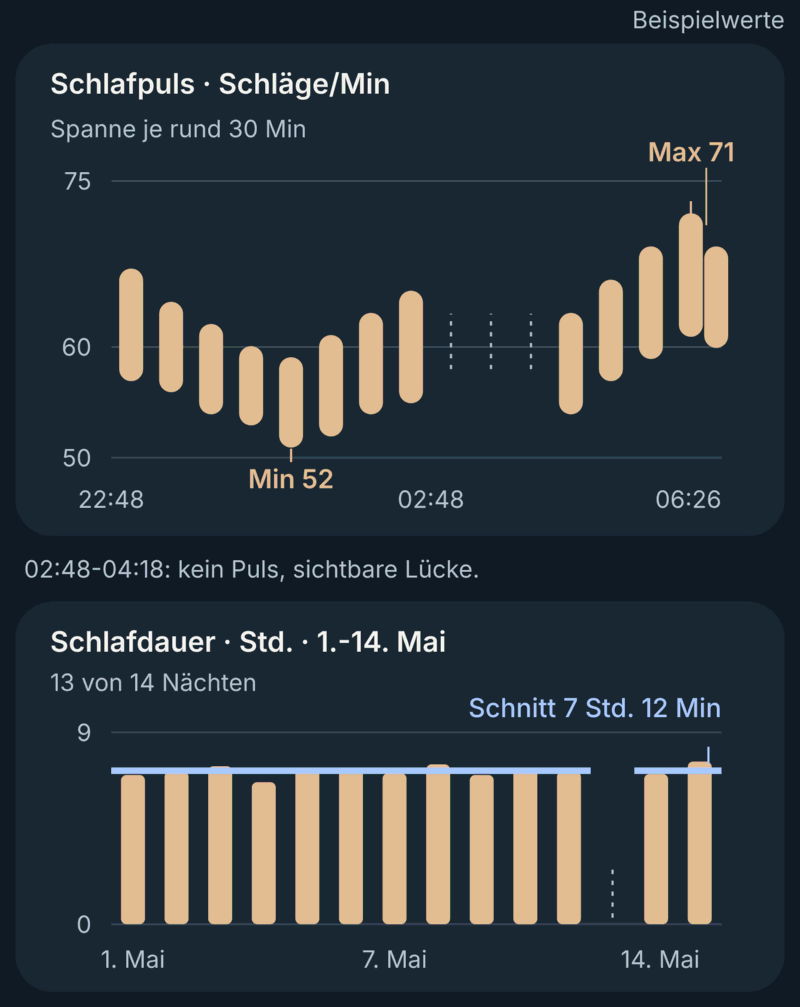
One chart shows the pulse during the night, bars show the length of the last 14 nights. There is no sleep index.

Pulse during one night with a visible gap, and bars for the length of 14 nights. Sample values.

Every measurement

Apple Health sometimes holds measurements an app never shows.

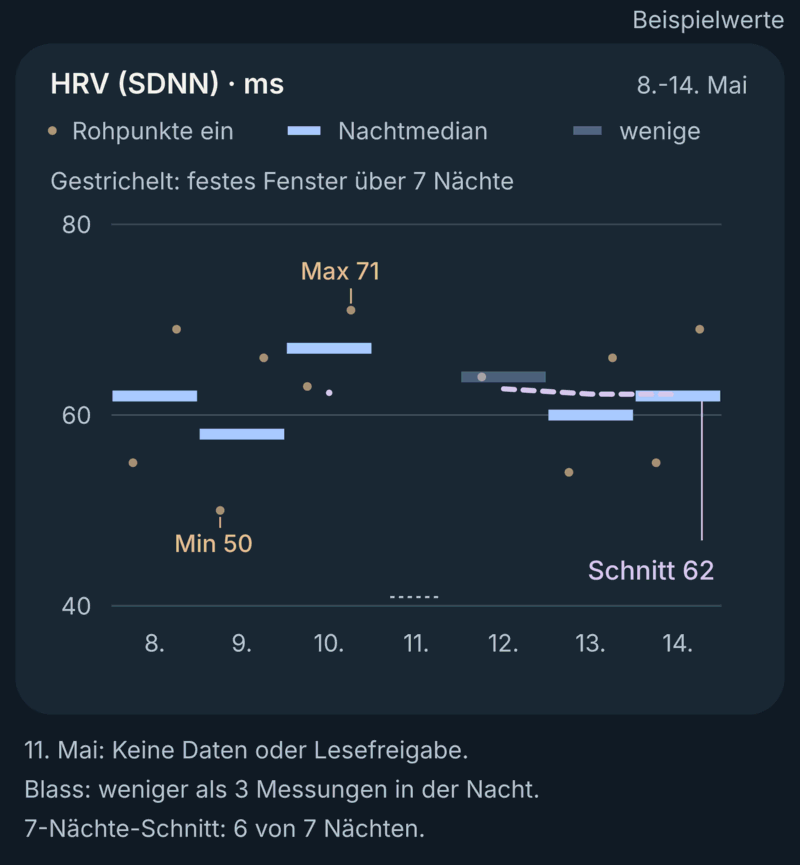
SimplePulse takes every measurement Apple Health delivers and shows how many there are. Where nothing was measured, a gap stays a gap, and nothing gets filled in.

Bars for seven nights with one night missing, and a note on the number of measurements. Sample values.

Right away

If you only want a quick look, you don't want to wait for something to load.

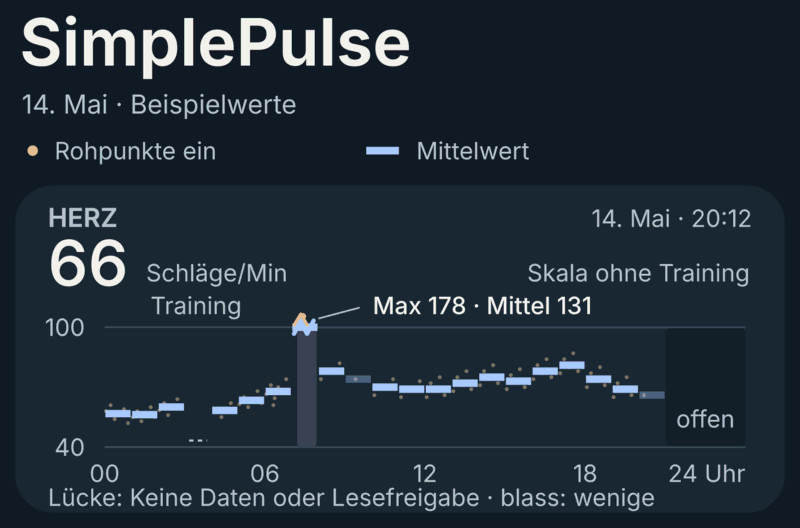
When you open the app, the last computed state is there right away. Every value says when it was measured, even if the watch hasn't synced everything yet.

Heart card in the overview with the latest value and its measurement time. Sample values.

Why I built this

There is so much data, but the apps around it are overloaded: ratings, points, tips, and the value I wanted to see somewhere in between.

Health held measurements my app did not show. Next to “elevated stress” it said “Great”.

I just wanted to see the most important values, shown well. So I built myself an app that does exactly that.

Common questions

Where is my data?
Only on your iPhone. SimplePulse reads the values from Apple Health and keeps the latest state in a file on the device, which also stays out of backups. The app sends your values nowhere: it has no server, no analytics and no crash reporting of its own. Only during testing, Apple's TestFlight collects crash and usage data, and SimplePulse passes no Apple Health values to it. Whether Apple Health itself syncs through iCloud is your setting at Apple.
Do I need an account?
No. No sign-up, no email address. You only allow the app to read Apple Health.
Where do the values come from?
Only from Apple Health. SimplePulse measures nothing itself and writes nothing back. Values from your scale appear too, as far as they reach Apple Health.
Why no score?
A score packs many things into one number, and you can no longer see what is behind it. SimplePulse shows the measurements themselves. What you make of them is up to you.
Why is a value not there right away?
The Apple Watch syncs with the iPhone on its own schedule, so a new value can reach Apple Health later. That is why the app shows the measurement time with every value.
What is missing?
Sleep index and readiness: neither can be read by third-party apps. Ratings such as stress or recovery are left out on purpose.
Is this a medical device?
No. SimplePulse gives no diagnosis and no treatment recommendation. The app only shows what is in Apple Health.
When is the app coming?
It is still in testing. There is no date.

Only what matters, shown clearly.